Your app answers HTTP. ARK does the rest.
By default every message takes the same path, and every step has one clear outcome you can see. When one path isn't enough, draw a flow.
Point it at a topic
Describe a pipeline in YAML: source topic, your endpoint, where results and failures go.
ARK checks and calls
Data rules validate each message, routing rules can skip the call, and ARK POSTs the rest with a stable correlation ID.
Results land in Kafka
Answers go to the result topic, bad data to the reject topic, failures to the dead-letter topic, each with the reason.
Everything a Kafka consumer should have, already done.
Built and tested against a real broker: crashes, rebalances, dead apps, bad data.
Delivery you can trust
At-least-once with in-order commits. A stuck message is retried in place, never skipped. Order is kept per key.
Data rules
Required fields, types, ranges, patterns, enums, formats, size, unknown fields, keys and headers. Bad data never reaches your app.
Rules without code
Route before or after the callback with simple conditions: auto-approve small orders, send big ones elsewhere.
Dead letters you can act on
Browse, retry or discard with the reason attached. Redrive on a schedule. Handled stays handled across restarts.
Protects your app
Concurrency limits, a circuit breaker with health probes, backpressure on 429, and load balancing across backends.
Cluster on Kafka itself
Shared config, cluster-wide pause, label-based placement and fast failover. No etcd, no ZooKeeper, nothing new to run.
AI assistant over MCP
Ask what is happening and why, explain an error, find weird data, tune throughput, draft pipelines you approve first.
Secure by default
Viewer, operator and admin tokens for the API and for MCP, per-pipeline AI access, and an audit log for every change.
See everything
Prometheus metrics for throughput, latency, lag, oldest uncommitted age, breaker state and every rule match.
Flows like a workflow
Conditions anywhere, fan-out to several apps, webhooks and topics, and a line of its own for every answer, reject and failure.
Talks to your stack
OpenSearch, Elasticsearch, NiFi, another Kafka, Slack, Discord, Teams and any API, each with send patterns that fit it.
A console for all of it
A live canvas of every pipeline, a flow designer, dead letters, rules, metrics, projects and Ask ARK, in four languages.
Draw where each message goes.
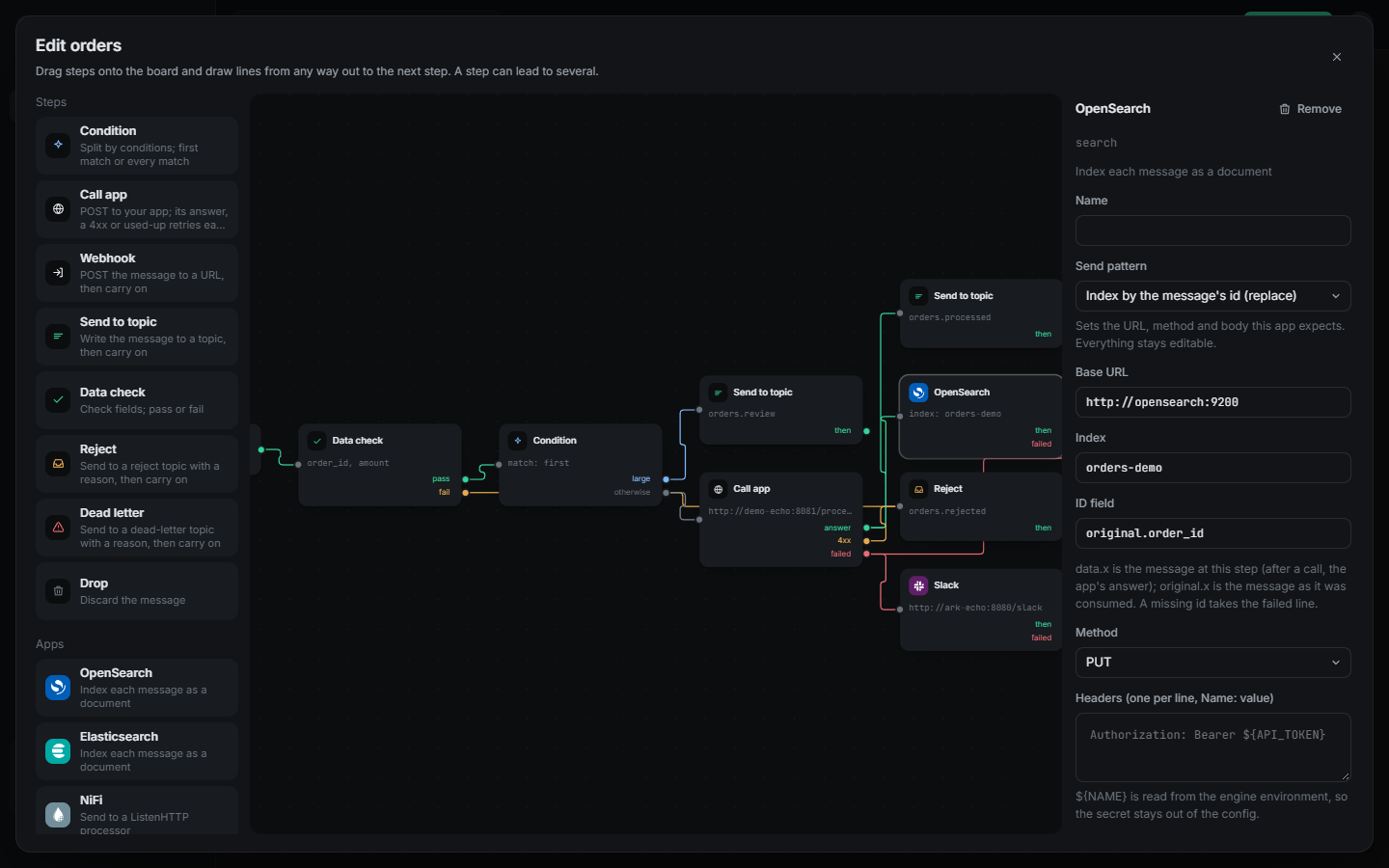
Give a pipeline a flow and its steps join in any shape, the way a workflow tool works, while delivery stays at-least-once and every message commits once.
- Conditions anywhere. Split on the message, the app's answer or the failure reason, to one branch or all of them.
- Every outcome has a line. A call's answer, a 4xx and used-up retries each go their own way: another app, a webhook, a topic, or all at once.
- Send patterns per app. Index by id in OpenSearch, a Block Kit card in Slack, PUT by id to an API. URL and body templates fill in the rest, and secrets come from the environment.
- No loops, no surprises. A loop is refused before it runs, and the host of a URL can never come from a message.
flow:
  start: [check]
  steps:
    - {id: check, type: data_check, next: [size], on_fail: [bad]}
    - id: size
      type: condition
      branches: [{when: "data.amount >= 2500", next: [review]}]
      otherwise: [app]
    - id: app
      type: call
      target: {url: http://order-app:8080/process}
      next: [processed, search]
      on_reject: [bad]
      on_failure: [dlq, alert]
    - id: search
      type: webhook
      app: opensearch
      method: PUT
      url: "http://opensearch:9200/orders/_doc/{{path .original.order_id}}"
      body: "{{json .data}}"
    - id: alert
      type: webhook
      app: slack
      url: https://hooks.slack.com/services/${SLACK_PATH}
      message: "{{.reason}}"
    - {id: review, type: topic, topic: orders.review}
    - {id: processed, type: topic, topic: orders.processed}
    - {id: bad, type: reject}
    - {id: dlq, type: dead_letter}
See it move. Change it by drawing.
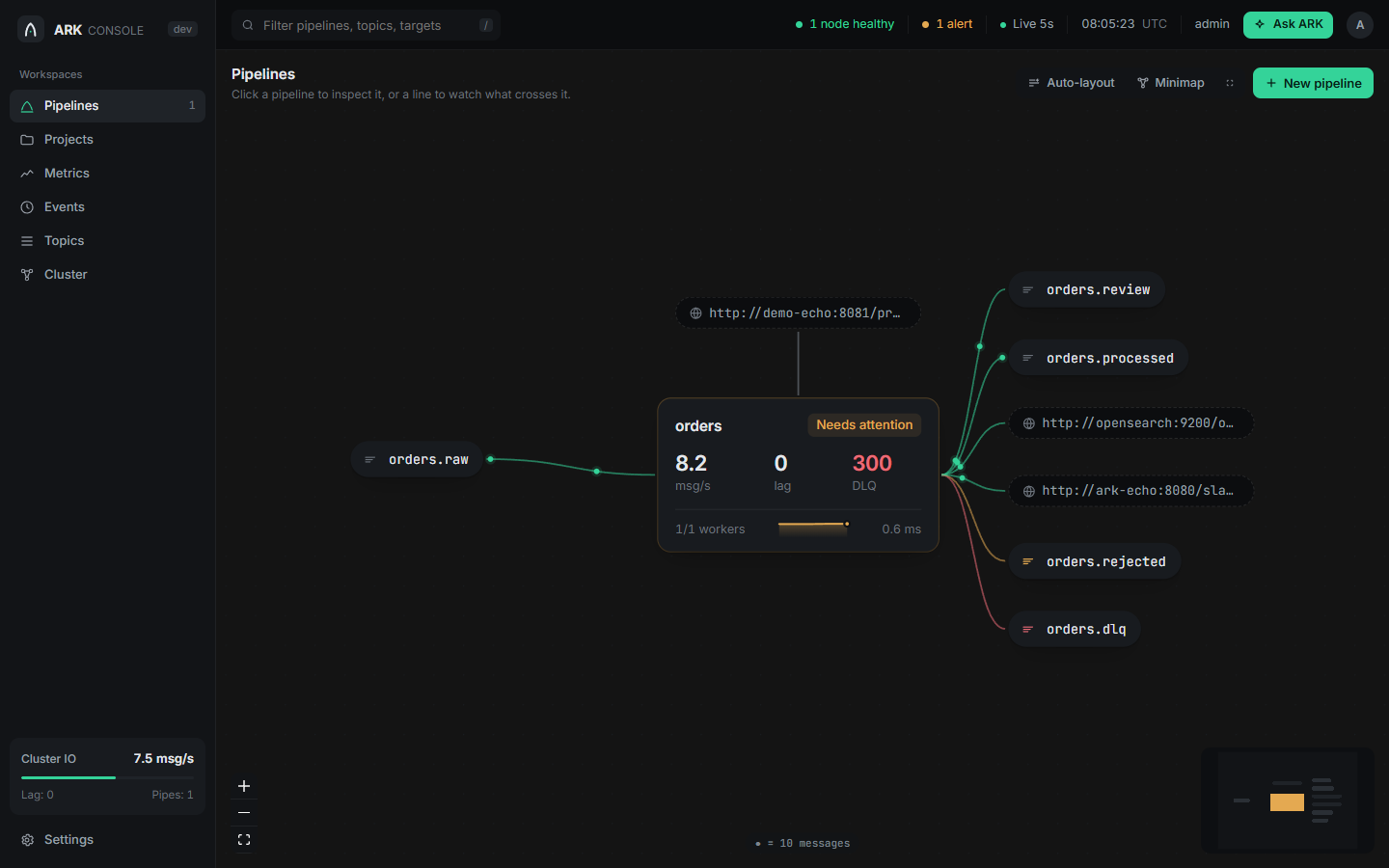
Every pipeline on one live canvas, where each dot is ten real messages. Right-click a pipeline to open it in the flow designer, pick an app and its send pattern, review the config and apply.
From zero to flowing in two minutes.
All you need is Docker. The demo starts Kafka, ARK, and a tiny app that echoes what it receives.
Start it
Kafka, ARK and the demo app, with one pipeline from orders.raw to orders.processed.
git clone https://github.com/raven-clown/ark.git && cd ark
docker compose up -d --build
Send three orders
A good one, one that breaks a data rule, and one the app fails on.
printf '%s\n' \
  '{"order_id":"A1","amount":10}' \
  '{"order_id":"A2","amount":-5}' \
  '{"order_id":"A3","amount":7,"fail":true}' \
| docker compose exec -T kafka /opt/kafka/bin/kafka-console-producer.sh \
--bootstrap-server localhost:9092 --topic orders.rawSee where each went
A1 is processed, A2 is rejected with the broken rule, A3 is dead-lettered after 3 tries. Every one carries its reason.
topic() { docker compose exec -T kafka /opt/kafka/bin/kafka-console-consumer.sh \
  --bootstrap-server localhost:9092 --from-beginning --timeout-ms 5000 \
  --property print.headers=true --topic "$1" 2>/dev/null; }

topic orders.processed   # A1, with the app's answer
topic orders.rejected    # A2: amount is -5, below the minimum 0
topic orders.dlq # A3: answered status 500, 3 attemptsAsk ARK
Over the REST API, or from any MCP client in plain language.
curl -s localhost:8080/api/v1/pipelines/orders/dlq \
  -H 'Authorization: Bearer demo-admin-token'

claude mcp add --transport http ark http://localhost:8080/mcp \
  --header "Authorization: Bearer demo-mcp-token"
One pipeline, one block of YAML.
No code, no framework. Change it and reload: an invalid config is refused before it touches anything running.
- Every failure has a place. A dead-letter topic, or a line you draw, so a message always ends up somewhere you can see it.
- Scale with one number.
workerssplits partitions inside one process, or across a cluster. - Your timezone. Every time ARK shows you is ISO 8601 in the zone you set.
brokers: [kafka:9092]
timezone: Asia/Bangkok

pipelines:
  - name: order-processor
    source_topic: orders.raw
    destination_topic: orders.processed
    dead_letter_topic: orders.dlq
    reject_topic: orders.rejected
    consumer_group: order-processor
    workers: 3

    target:
      url: http://order-app:8080/process
      health_check_url: http://order-app:8080/health
    retry: {max_attempts: 3, backoff_ms: 1000}

    data_rules:
      on_violation: reject
      fields:
        - {path: order_id, required: true, type: string}
        - {path: amount, type: number, min: 0}

    fast_path_rules:
      - name: auto-approve-small
        condition: "data.amount < 100"
        action: pass_through
Ask your pipelines what's wrong.
ARK speaks MCP, so any AI client and any model can operate it. It works out what you mean first, asks back when something is unclear, and answers from real data, never guesses.
- What, why, what to do. Diagnoses come with the evidence and the next step.
- Finds weird data. Samples real messages, spots odd fields and outliers, and drafts rules to catch them.
- Changes need your OK. Every config change is a preview and a diff first, applied only after you confirm.
- Least privilege. Read-only, operator or admin tokens, and a per-pipeline limit on top.
- 1 message in the DLQ. Your app answered 500 on all 3 attempts for order A3.
- 1 message rejected. A2 had amount -5, below the minimum 0.
Stop writing Kafka glue.
Point ARK at a topic and an endpoint. Everything else is already done.